


Hometown Fan
4.6728.00 Reviews
App Specs
- Version
- 4.15.1
- Updated On
- License
- Free
- Downloads
- 100,000+
- Developer
- HomeTown Ticketing, Inc.
- Categories
- Events
- Platform
- Android
Screenshots
 Analysis by AppCompare
When I decide whether a local-events app is worth keeping, I look for more than a busy calendar. I want it to help me spot something worth doing, make it easy to keep track of community updates, and avoid becoming another noisy feed I have to manage. Hometown Fan is aimed at that hometown-sized need: finding local happenings and staying in touch with what is going on nearby.
That focus matters. A nationwide event-discovery service can be useful when I am planning a trip or searching across a large area, while a town’s own social pages may be better for conversations and last-minute notices. This app sits between those habits, bringing local events and community information into one place. Whether it is the right fit depends on how much useful material is available for your area and whether you prefer a dedicated local app to checking several familiar sources.
Start with the town, not the download
Before relying on any community app, I would check whether it covers the places where I actually spend time: home, work, school, or the neighboring town where weekend plans tend to happen. Hometown Fan’s setup lets you choose a location, and you can enter a city manually instead of granting location access. That is a practical choice if you would rather decide what area the app uses than share your device’s location.
There is a useful trade-off here. A manually chosen town gives you control, but it also means the feed may not reflect where you are when you travel or move between communities. I would treat the selected location as a starting point and check whether the events and updates match the places I care about. If the local coverage feels thin, the app may still be useful for one part of your routine, but it may not replace the town website, venue pages, or social channels you already use.
Where a local hub can save effort
The strongest case for Hometown Fan is the person who wants a quick view of community life without searching every venue and organization separately. A parent checking for school-area activities, a resident curious about a weekend market, or someone new to town looking for local happenings could all benefit from having a calendar and community board close together. The app is free, which makes it easy to try as a supplement before deciding whether it deserves a regular place on your phone.
A realistic routine might look like this: on a Thursday evening, I open the event calendar to see what is happening over the weekend, then scan the community board for a smaller gathering or practical notice I might otherwise miss. I can use the local-news updates as a separate check for community matters rather than treating the app as a source for every kind of news. The value is not that it makes plans for me; it reduces the number of places I need to check before I make them.
There is also a small but useful planning habit I would recommend: look through the calendar when you have time, then revisit it closer to the day before committing to a plan. Local listings and community posts are most helpful when they are current, and a quick second look can keep an interesting discovery from being mistaken for a confirmed plan. For anything important, I would still use the event organizer’s own information as the final check.
Worth Reading Before You Choose

EA SPORTS FC Mobile 26 Is a Bigger Football Game, but It Takes Time

Flipboard Shows What News Apps Must Do Beyond the Feed

Switching to Android Auto Means Rethinking Your Driving Routine

Google Calendar Makes a Crowded Week Easier to Manage

Ludo King Makes the Most of the Minutes Between Plans

Baby Panda World Brings Quick Play to Modern Phones, but Its Game Library Feels Busy
What it does better than scattered sources
Compared with searching a general events platform, a local hub has a narrower point of view. That can be an advantage when I care about what is happening around my own community rather than browsing major attractions in a broad region. Compared with following several social accounts, a shared calendar and board can feel more organized, especially when I am trying to discover something rather than waiting for a post to appear in a feed.
But those alternatives have their place. A venue’s own page is usually the sensible destination for the latest details about one specific event, and a town’s official channels may be preferable for notices that need to be authoritative. A general search or broader event service can be better when I am traveling, comparing options across multiple cities, or looking for a highly specialized activity. I would use Hometown Fan as a convenient local starting point, not as a reason to abandon every source that has served me well.
Small-town coverage and notification trade-offs
Coverage is the biggest practical question. The app can only help me discover what is represented in its local content, and smaller towns may have fewer listings or updates to browse. In that case, a quiet feed does not necessarily mean that nothing is happening; it may simply mean that local organizations and residents are not using the app as much. I would compare what appears there with a town calendar or a couple of familiar community sources before deciding that it covers the whole area.
Notifications need a little attention too. Updates can be useful when they bring time-sensitive local information to me, but frequent alerts can make me ignore all of them. I would start by reviewing the notification settings and keeping only the kinds of updates I genuinely want to receive. If I prefer checking news and events on my own schedule, opening the app deliberately may be a better routine than letting every category interrupt the day.
How much change does it ask of you?
Switching to a dedicated local app does not have to mean replacing a calendar, social feed, or town website. I would begin by using it for discovery, then keep whichever existing source is better for confirmed details or official notices. That low-commitment approach makes it easier to judge whether the local calendar and board add something real, rather than moving all my habits at once and finding out later that a favorite source is missing.
It is also worth thinking about who should skip it. If you mainly need broad travel planning, a specialized national or regional events service is likely a better first stop. If your town has little activity in the app, or you already follow a well-maintained community calendar that meets your needs, adding another feed may create more checking without adding much insight. For people who prefer not to use a location-based local service at all, relying on direct venue pages and official town information may feel more comfortable.
A sensible fit for community-minded users
Hometown Fan is an events app from HomeTown Ticketing, Inc., and its appeal is the combination of a local event calendar, a community board, and concise local updates. It has a 4.6 average from around 15,000 ratings, with more than 100,000 installs. Those figures suggest that it has found an audience, but I would still judge it by the quality of the feed for my own town, since local usefulness can vary from one community to another.
The app is free, carries an Everyone age rating, and its current version is 4.15.0, with Android 8.0 as the minimum operating-system requirement. Those details make the basic decision straightforward for someone with a compatible device: try it, choose a location that makes sense, and see whether the calendar and board surface information you would otherwise miss. I would not install it expecting every town to have equally rich coverage or every community notice to replace an official source.
So, I recently got my hands on this app called Hometown Fan, and I’ve been diving into it over the past few days. If you’re someone who loves keeping up with local events and happenings, this app might just be your new best friend. Let me walk you through my experience with it.
Getting Started with Hometown Fan
First things first, downloading and setting up Hometown Fan was a breeze. You can snag it from both the Google Play Store and Apple’s App Store. Once installed, the app greets you with a clean and intuitive interface. It’s like the developers knew exactly what we needed—simplicity and efficiency.
The initial setup involves selecting your location. This is crucial because the app tailors its content to your specific area. It’s pretty cool to see everything tailored just for my hometown. You can either allow the app to access your location or manually enter your city. I went with the manual entry because, you know, privacy and all that jazz.
The Features That Stand Out
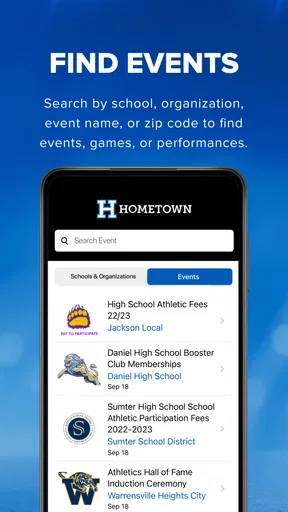
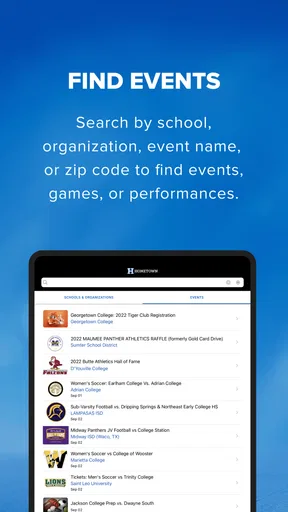
Now, let’s talk about what really makes this app shine. The core feature of Hometown Fan is its local event calendar. This isn’t just a boring list of events; it’s an interactive timeline that lets you explore everything happening around you. From concerts to farmer’s markets, it’s all there. I found myself scrolling through the events just because it was so easy and fun.
Another feature I appreciate is the community board. This is where users can post about local happenings, lost pets, or even garage sales. It’s like a digital bulletin board that keeps you in the loop. I’ve already found a couple of cool events I didn’t know about, thanks to this feature.
Plus, the app includes local news updates. This isn’t your typical news feed filled with fluff. It’s concise and relevant, focusing on what matters most to the community. You get updates on everything from local politics to weather alerts.
User Experience and Interface
One thing I have to highlight is the user experience. The developers nailed it with the UI design. It’s intuitive, with a clean layout that doesn’t overwhelm you with too much information at once. Navigation is a breeze, and I didn’t experience any lag or crashes, which is a huge plus.
What’s also neat is how customizable the app is. You can set your preferences for what types of events you’re interested in, and the app will prioritize those in your feed. It’s like having your own personal assistant who knows exactly what you’re into.
Room for Improvement
No app is perfect, and Hometown Fan is no exception. While the app does a fantastic job with local events and news, I did notice that some smaller towns don’t have as much content. It seems like the app thrives in more populated areas. Hopefully, as more users join, this will change.
Another minor gripe is the notification system. While it’s great to get updates, the default settings were a bit aggressive for my taste. I had to tweak the settings to avoid my phone buzzing every few minutes. But hey, that’s an easy fix.
Final Thoughts
Overall, I’m genuinely impressed with Hometown Fan. It’s a solid app that brings communities closer by keeping everyone informed about local happenings. Whether you’re looking to discover new events or just want to stay updated on local news, this app has got you covered.
If you’re tired of missing out on what’s happening in your hometown, give Hometown Fan a shot. It’s a handy tool that makes you feel more connected to your community. Just remember to customize those notifications unless you want your phone buzzing like a bee!
Pros
- User-friendly interface for easy navigation.
- Real-time updates on local sports events.
- Customizable notifications for favorite teams.
- In-depth statistics and analytics available.
- Social features to connect with other fans.
Cons
- Requires stable internet for optimal performance.
- Limited support for lesser-known sports.
- Advertisements can be intrusive at times.
- Some features are locked behind a paywall.
- Occasional bugs in live score updates.
FAQs for Hometown Fan
What is Hometown Fan, and what does it offer?
Hometown Fan is a comprehensive app designed to connect users with local sports teams and community events. It offers features like live scores, team schedules, and event updates, providing fans with a personalized experience. Users can follow their favorite teams, receive notifications, and access exclusive content and merchandise.
Is Hometown Fan free to use, or are there any in-app purchases?
Hometown Fan is free to download and use, offering a variety of features at no cost. However, there are optional in-app purchases available for users who want to access premium content, remove ads, or gain exclusive insights. These purchases are not necessary for basic functionality.
How does Hometown Fan ensure user privacy and data security?
Hometown Fan prioritizes user privacy by implementing robust security measures. The app complies with data protection regulations, ensuring that user information is encrypted and stored securely. Users have control over their data and can customize privacy settings through the app’s interface.
Is Hometown Fan available on both Android and iOS platforms?
Yes, Hometown Fan is available for both Android and iOS users. The app can be downloaded from the Google Play Store for Android devices and the Apple App Store for iOS devices. It is optimized to run smoothly across a variety of smartphone models and operating systems.
Can I use Hometown Fan to follow multiple teams or events simultaneously?
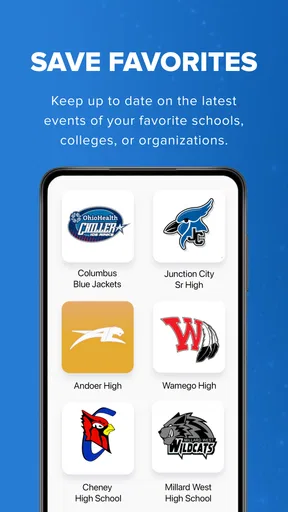
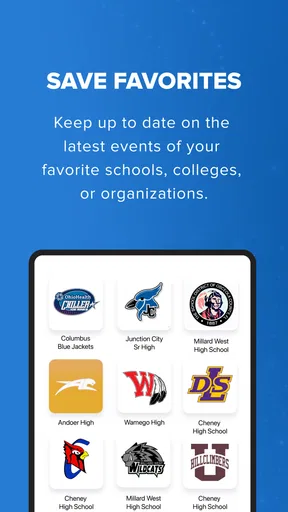
Absolutely! Hometown Fan allows users to follow multiple teams and events at the same time. You can customize your feed to include updates from various sports leagues, local events, and community activities. This feature ensures you stay informed about all the happenings you care about.


